![Logo-transparent-rectangle.png]](https://help.digitaldoorlocks.com.au/hs-fs/hubfs/Logo-transparent-rectangle.png?height=40&name=Logo-transparent-rectangle.png)
How to Set Up:
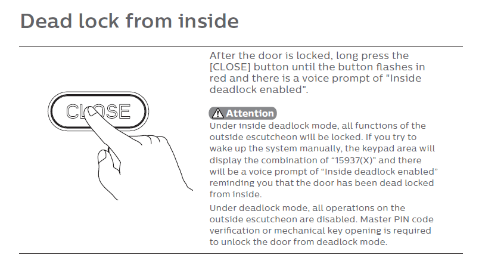
Option 1: On the Lock
Follow the steps shown in the image below to enable this feature directly on the lock.
Important:
👉 Unlocking the door from the inside will automatically turn off Privacy / Dead Lock mode.
Option 2: Using the App
-
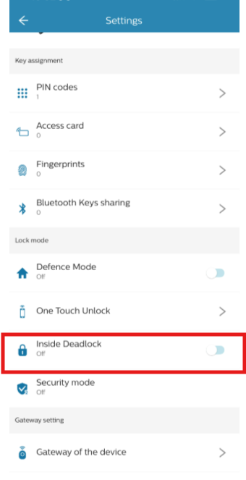
Open the app and select your door lock.
-
Tap Settings (gear icon).
-
Scroll down to Inside Deadlock.
-
Toggle the switch ON or OFF to enable or disable Privacy / Dead Lock mode.