- Help Centre
- SAMSUNG - INTERNAL - Technical Support
- Door Lock SHP-A30
-
SAMSUNG - Technical Support
-
SAMSUNG - Online Video
-
SAMSUNG - INTERNAL - Technical Support
- Support Team Call Flow
- Door Lock SHP-A30
- Door Lock - SHP-DP609
- Door Lock - SHP-DR708
- Door Lock - SHP-DP728
- Door Lock - SHP-DP727
- Door Lock - SHS-P718
- Door Lock - SHS-P717
- Door Lock - SHP-DH538
- Door Lock - SHP-DH537
- Door Lock - SHS-3321
- Door Lock - SHP-DS510
- Door Lock - SHP-DS705 (SHS-D607)
- Door Lock - SHS-H505
- Door Lock - SHS-H705
- Door Lock SHS-7020
- Door Lock - KL-100B & KL-100S (Keyless key)
- General Miscellaneous
- Accessory/ Lock Parts
- CCTV
- HubSpot
- Work Order Process
-
INTERNAL - Logistics
-
INTERNAL - Documents
-
INTERNAL - Product and Merchandising Manager - SOP
→ Troubleshooting 5-How to activate Unlocking With Voice on Alexa via Mobile App
1. Go to the menu by tapping the 3 lines on the top left of the screen.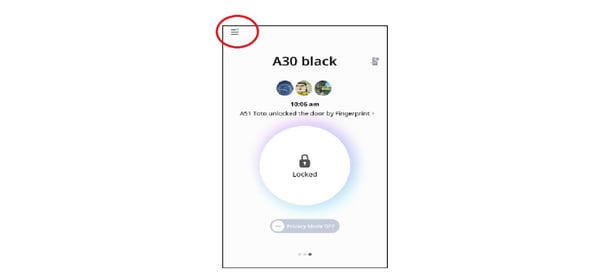
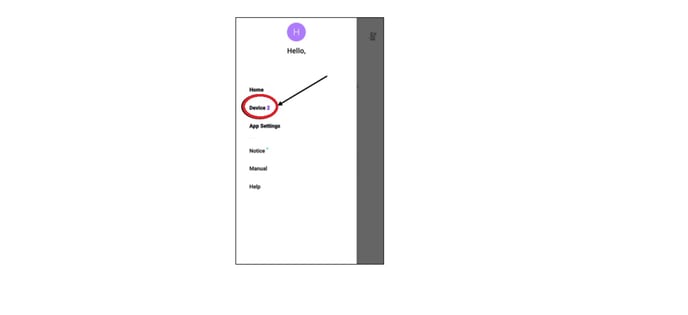
2. Select DEVICE
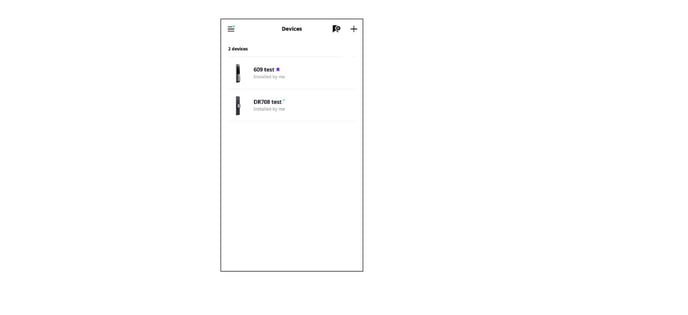
3. Select A30 (A30 is not included in the sample image but it should be there once A30 has been added to the registered device).
4. Scroll down and look for LINKED SERVICES (it should show Alexa as a linked device) then select ALEXA.
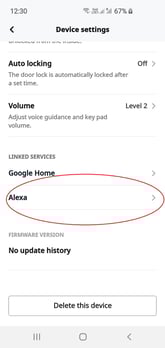
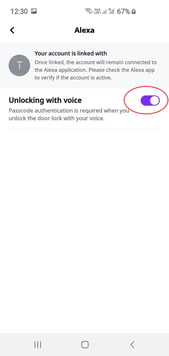
5. Toggle the switch to enable or disable UNLOCKING WITH VOICE.