
- Help Centre
- SAMSUNG - INTERNAL - Technical Support
- Door Lock SHP-A30
-
SAMSUNG - Technical Support
-
SAMSUNG - Online Video
-
SAMSUNG - INTERNAL - Technical Support
- Support Team Call Flow
- Door Lock SHP-A30
- Door Lock - SHP-DP609
- Door Lock - SHP-DR708
- Door Lock - SHP-DP728
- Door Lock - SHP-DP727
- Door Lock - SHS-P718
- Door Lock - SHS-P717
- Door Lock - SHP-DH538
- Door Lock - SHP-DH537
- Door Lock - SHS-3321
- Door Lock - SHP-DS510
- Door Lock - SHP-DS705 (SHS-D607)
- Door Lock - SHS-H505
- Door Lock - SHS-H705
- Door Lock SHS-7020
- Door Lock - KL-100B & KL-100S (Keyless key)
- General Miscellaneous
- Accessory/ Lock Parts
- CCTV
- HubSpot
- Work Order Process
-
INTERNAL - Logistics
-
INTERNAL - Documents
-
INTERNAL - Product and Merchandising Manager - SOP
→ Troubleshooting 4- Deadbolt Extending rather than retracting and vise versa
The door lock was doing the opposite (deadbolt extended - "Opened" and deadbolt retracted - "Closed"). We weren't able to go the registration mode unless the deadbolt was extended. We tried to set the direction again by following the steps below but it still did not resolve the issue.
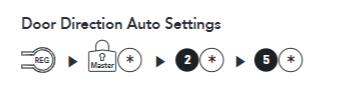
Solution:
I had the customer disassemble the in-body (while deadbolt was retracted), placed the thumb turn in the 12 o'clock position. After that, mounted the in-body body back to the mounting plate. Installed batteries and set the door direction again. Resolved
In case the issue is the same, ask the customer to factory reset the lock and set the lock direction again.